Universe
last updated: june 28, 2025
This module is based on a discrete model of cellular automata. The foundation of this model is a space consisting of adjacent cells that form the "Universe." Each cell in the "Universe" can be alive, dead, immortal, or non-revivable. The size of the "Universe" is limited to 8 by 16 cells, but its borders are wrapped: the left side continues into the right, the top into the bottom, and vice versa. The eight cells surrounding each cell are called its neighborhood.
The transition of cells from one state to another is determined by rules you define. These rules are the same for all cells. In one step, the automaton processes each cell and, based on its current state and the state of its neighborhood, determines the new state that will be applied in the next generation. Before launching the automaton, you set the initial state of the cells manually or randomly.
For example, consider the rules of John Conway's "Game of Life," which in the "Universe" module are specified by the values of 3 for the "new" slider and 2 for the "keep" slider. Under these rules, "life" in an lonely cell disappears in the next generation since it lacks either three neighbors to give birth to new life or two neighbors to sustain it.
The transition of cells from one state to another is determined by rules you define. These rules are the same for all cells. In one step, the automaton processes each cell and, based on its current state and the state of its neighborhood, determines the new state that will be applied in the next generation. Before launching the automaton, you set the initial state of the cells manually or randomly.
For example, consider the rules of John Conway's "Game of Life," which in the "Universe" module are specified by the values of 3 for the "new" slider and 2 for the "keep" slider. Under these rules, "life" in an lonely cell disappears in the next generation since it lacks either three neighbors to give birth to new life or two neighbors to sustain it.

First generation

Second generation
With two adjacent populated cells, the situation is similar: each of them has only one neighbor, which does not meet the conditions for sustaining life.

First generation

Second generation
However, with three adjacent populated cells, the situation changes. The central cell now has two neighbors, which satisfies the condition for keeping life. The cells above and below the central one each have three neighbors, which falls under the rule for new life generation. But the two cells at the ends of the original line have only one neighbor, which is not enough either for keeping life or for new generation, so they die in the next generation.
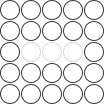
First generation
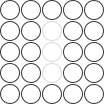
Second generation
In the second generation, the situation repeats, because the new figure is identical to the first one, only rotated by 90 degrees. As a result, an oscillating figure is formed, known as a "blinker."
Third generation
Cell occupancy is measured in arbitrary parts of the "Universe." These parts are grouped into "Communes."
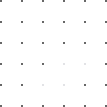
A commune of four cells is represented by light dots
Each "Commune" either reacts to the occupancy of any individual cell or interprets the occupancy density as a percentage.
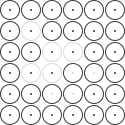
None of the cells in the commune are occupied, the signal is 0%
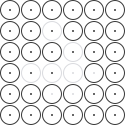
One of the four cells in the commune is occupied, the signal is 25%
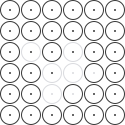
Two of the four cells in the commune are occupied, the signal is 50%
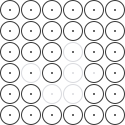
Three of the four cells in the commune are occupied, the signal is 75%
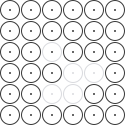
All four cells in the commune are occupied, the signal is 100%
Thus, the development of "life" in the "Universe" transforms into a "living" signal, which can control the parameters of other Cellular modules to make the sound "alive."
References
What the interface elements do

Universe module activation button
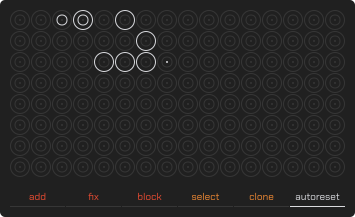
Universe screen
The universe is infinite — the left edge continues to the right, the bottom continues to the top, meaning each cell has eight neighbors.

Universe "dead" cell

Universe "alive" cell

Universe editable cell

uneditable cell

Universe cell that does not belong to the selected "Commune"

Universe cell that belongs to the selected "Commune"
Touching cells with "add" brush adds or clears "life"; with "fix" brush, it sets "immortality"; and with "block" brush, it enforces "non-revivability."

Adding brush activation button

fixing brush activation button

blocking brush activation button
Use the commune selection mode button to choose a commune by simply tapping universe cells, and use the commune cloning mode button to quickly replicate the link with the last selected commune across other universe cells.

Commune selecting mode activation button

Commune cloning mode activation button
Auto-reset mode returns cellular automata to their initial state when a new voice is activated or the last is released. Outside auto-reset mode, "life" continues evolving from the last state.

Auto-reset mode toggle button
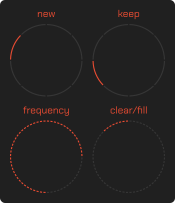
Cellular automata settings sliders panel

Life birth and rebirth conditions slider with range from 0 to 8 neighbours

Life sustain conditions slider with range from 0 to 8 neighbours

Life sustain conditions slider with range from 0.1 to 30 Hz

Adding or removing life in random cells slider, where left-right deviation erases or adds life in random cells
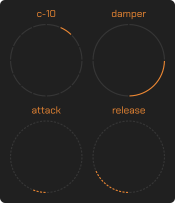
Commune settings sliders panel

Commune selection slider with range from C-01 to C-16

Selected commune mode slider that switches between "Trigger," "Choir," "Breaker," and "Damper" modes
The first mode outputs maximum signal if at least one cell in the commune is populated, the second mode reflects signal strength proportional to the population share, the third outputs a minimum signal if at least one cell is populated, and the last attenuates the signal proportionally to the population share.

Selected commune signal attack time slider with range from 0.001 to 2 seconds

Selected commune signal release time slider with range from 0.001 to 2 seconds
The indicator appears above the cellular automata settings panel only when the commune settings sliders are touched.

Selected commune signal indicator
Guides
Short answers to “how to?” questions
- At the bottom of the "Universe" screen, press the "add" button to activate the life-adding mode.
- Tap a "dead" cell to "revive" it.
- Ensure that the cell's state has changed.
- Tap a "live" cell to remove "life."
- Ensure that the cell's state has changed.
- At the bottom of the "Universe" screen, press the "fix" button to activate the mode for fixing cells in the "immortal" state.
- Tap a "non-immortal" cell to make it "immortal."
- Ensure that the cell's state has changed.
- Tap the cell again to remove this property.
- Ensure that the cell's state has changed.
- At the bottom of the "Universe" screen, press the "block" button to activate the mode for blocking cells in the "non-revivable" state.
- Tap a "non-revivable" cell to set it as "non-revivable."
- Ensure that the cell's state has changed.
- Tap the cell again to remove this property.
- Ensure that the cell's state has changed.
- At the bottom of the "Universe" screen, press the "autoreset" button to activate the auto-reset mode.
- Ensure that the "Universe" contains "live" mutable cells.
- Press a key on the keyboard or an external MIDI controller.
- Ensure that "life" in the "Universe" has progressed through one or more generations.
- Release the key on the keyboard or external MIDI controller.
- Ensure that the "Universe" returns to the state it was in before the key was pressed.
- On the cellular automata settings panel, use the radial "new" slider to specify a number from 0 to 8 neighbors required for a "dead" cell to "come to life" or a "live" cell to "regenerate" (continue living).
- Use the radial "keep" slider to specify a number from 0 to 8 neighbors required to sustain "life."
- Press a key on the keyboard or an external MIDI controller.
- Ensure that "life" in the "Universe" progresses through one or more generations according to the new rules.
- On the cellular automata settings panel, use the radial "frequency" slider to increase or decrease the generation transition rate.
- Press a key on the keyboard or an external MIDI controller.
- Ensure that the generations of "life" in the "Universe" progress at the new frequency.
- On the cellular automata settings panel, move the "clear/fill" slider fully to the left to clear the "Universe."
- Ensure that all cells in the "Universe" are cleared.
- On the cellular automata settings panel, move the "clear/fill" slider to the right.
- Ensure that "life" is generated in random cells.
- Activate the "Commune" selection button on the "Universe" screen.
- Select a cell.
- Drag the slider for the "Commune" you want to link the cell to.
- Ensure that the selected "Commune" displays a white dot on the cell.
- Activate the "Commune" selection button on the "Universe" screen.
- Select a cell of the desired commune.
- Activate the "Commune" clone button on the "Universe" screen.
- Select a cell where you want to clone the commune link.
- Ensure that both cells are now linked to the same commune.
- Populate the "Universe" with "life."
- Touch any slider in the "Commune" settings.
- The cellular automata settings panel will switch to the "Commune" signal indicator.
- Ensure that the signal is displayed correctly.
- Drag the radial mode slider for the selected "Commune."
- Select the "trigger" mode.
- Ensure that the signal reaches its maximum when at least one cell is populated.
- Drag the radial mode slider for the selected "Commune."
- Select the "breaker" mode.
- Ensure that the signal reaches its minimum when at least one cell is populated.
- Drag the radial mode slider for the selected "Commune."
- Select the "choir" mode.
- Ensure that the signal strength matches the occupancy density.
- Drag the radial mode slider for the selected "Commune."
- Select the "damper" mode.
- Ensure that the signal attenuation matches the occupancy density.
- Drag the "attack" slider to change the attack time of the "Commune" signal from 0.001 to 2 seconds.
- Ensure that the signal has the correct attack time on the signal indicator.
- Drag the "release" slider to change the release time of the "Commune" signal from 0.001 to 2 seconds.
- Ensure that the signal has the correct release time on the signal indicator.